
Audi Q3: Lock Carrier Cover, Removing and Installing, Vehicles through MY 2014
Removing
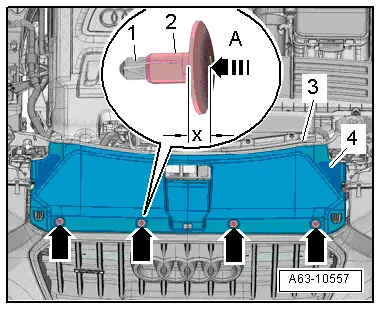
- To remove the expanding clips -arrows-, push the clamping pin -1- carefully to dimension -x- until it clicks into the expanding clip -arrow A-.
- Dimension -x- = 5 mm
- Pull out unlocked expanding clip -2- with the clamping pin.
- Remove the lock carrier cover -4- from the groove in the lock carrier -3-.
Installing
Install in reverse order of removal. Note the following:
- Install the expanding clip and push in the clamping pin until it engages audibly.
Lock Carrier Cover, Removing and Installing, Vehicles from MY 2015
Removing
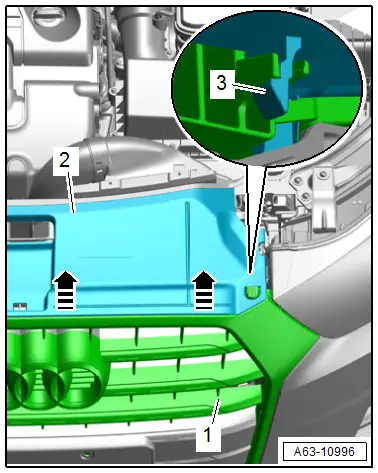
- Remove the lock carrier cover -2- from the radiator grille -1- and remove the lock carrier cover upward -arrows-.
- The retaining tabs -3- are released while doing this.
- Remove the lock carrier cover from the groove in the lock carrier.
Installing
Install in reverse order of removal. Note the following:
- Slide the lock carrier cover into the groove in the lock carrier cover and then push it onto the radiator grille and bumper cover.
Front Bumper Cover End Plate, Removing and Installing
Removing
- Remove the noise insulation. Refer to → Chapter "Noise Insulation, Removing and Installing".
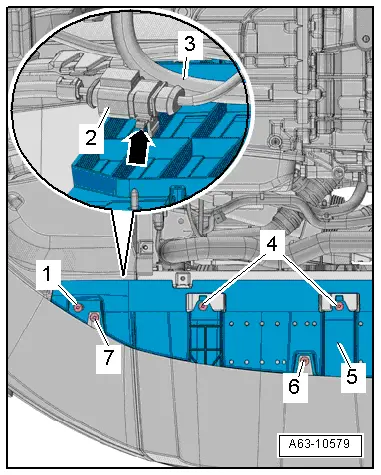
- Remove the bolts -1, 4, 6, and 7-.
- Push the end panel -5- slightly downward and remove the connector -2- from the bracket -arrow-.
- If installed, free up the water line -3- for cleaning the headlamps.
- Audi Q3 from MY 2015: Disconnect the connector from the Outside Air Temperature Sensor -G17- and free up the wiring harness.
- Pull the front bumper cover end plate back.
Installing
Install in reverse order of removal. Note the following:
- Install the noise insulation. Refer to → Chapter "Noise Insulation, Removing and Installing".
READ NEXT:
 Center Grille. Removing and Installing, Audi Q3 Offroad
Removing
- Remove the noise insulation. Refer to
→ Chapter "Overview - Noise Insulation".
- Remove the front bumper cover end plate. Refer to
→ Chapter "Front Bumper Cover
Bumper Cover Lower Section, Removing and Installing, Audi Q3
Removing
- Remove the front bumper cover. Refer to
→ Chapter "Bumper Cover, Removing and Installing".
- Remove the front bumper cover end plate. Refer to
→ Chapter "Front
Molded Foam Part, Removing and Installing, Audi Q3 through MY 2014
Removing
- Remove the front bumper cover. Refer to
→ Chapter "Bumper Cover, Removing and Installing".
- Guide the molded foam piece -2-
at the top out of the bracket -arrow-
aSEE MORE:
Select destination
Applies to: vehicles with navigation system
Fig. 129 Menu: select destination
Opening a menu
Applies to: MMI: Press NAVIGATION on the
home screen.
If the map is displayed, press
fig. 128.
The following functions are available:
Last destinations
Favorites
Contacts
Received destination
System settings
Introduction
General settings are described in this chapter.
You can find specific settings in the chapters
about those settings. The available settings depend
on the vehicle equipment.
Date and time
Applies to: MMI: Select on the home screen:
SETTINGS > General > Date & time.
Possibl